Vulnerable A records (IP addresses)
optional feature turned on by default
- detects A records pointing to AWS IP addresses no longer in use within organisation
- Elastic IP addresses
- EC2 instances with public IP addresses
- ECS Fargate public IP addresses
- GameLift Fleet IP addresses
- GameLift Container Fleet IP addresses
- Global Accelerator IP addresses
- Lightsail instance public IP addresses
- Lightsail static IP addresses
- automated takeover not supported


How an A record becomes vulnerable
A records pointing to an IPv4 address can be vulnerable to subdomain takeover:
- engineer creates EC2 instance with public IP address
- engineer creates Route53 A record pointing to address
- engineer deletes EC2 instance, releasing IP address
- engineer forgets to remove Route53 DNS record
- attacker creates EC2 instance in own AWS account, with same IP address
- company DNS record now points to attacker's virtual machine
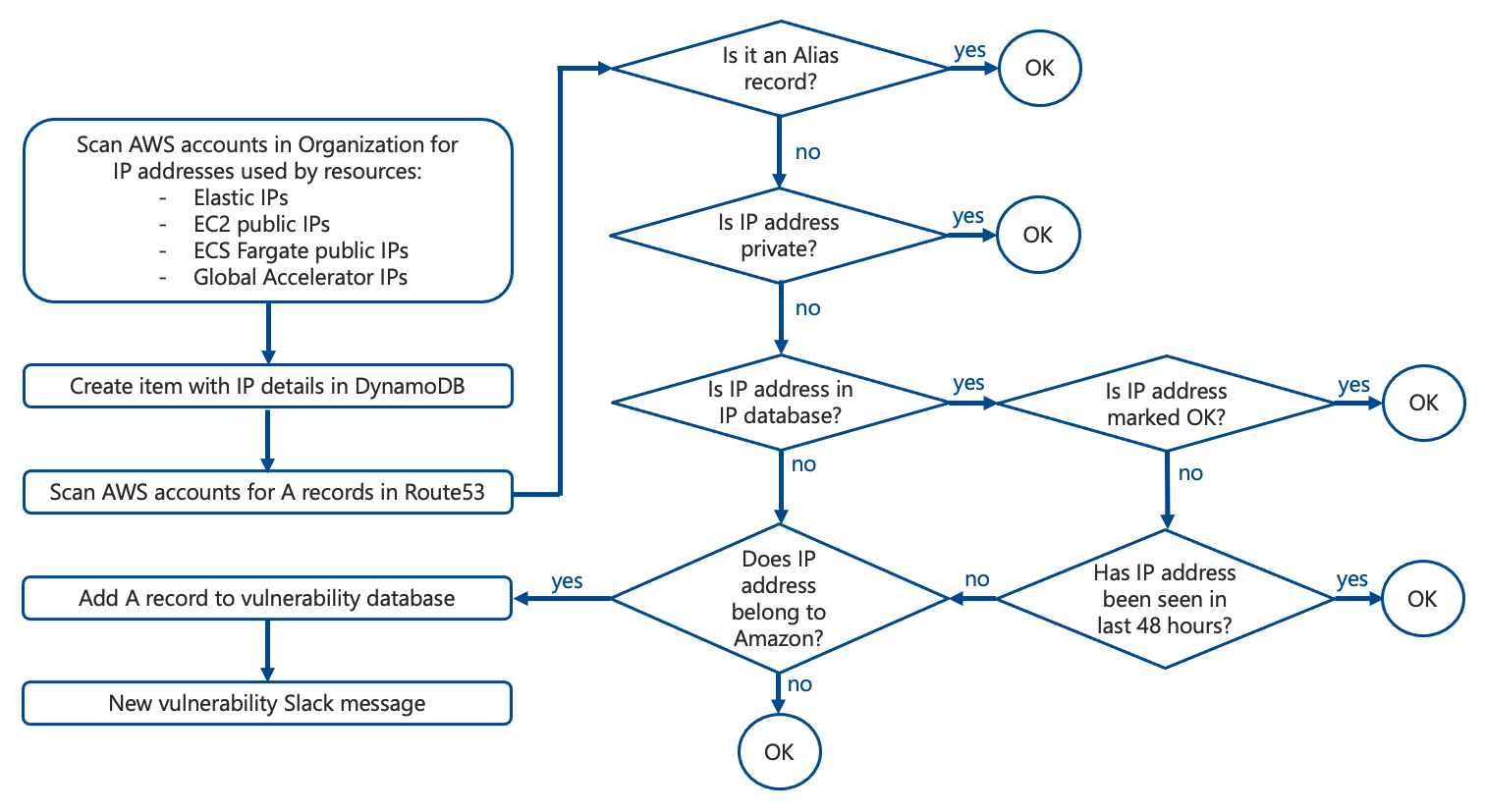
How Domain Protect determines if A record is vulnerable
- decision flow designed to minimise false positives
- only detects certain types of A record vulnerabilities
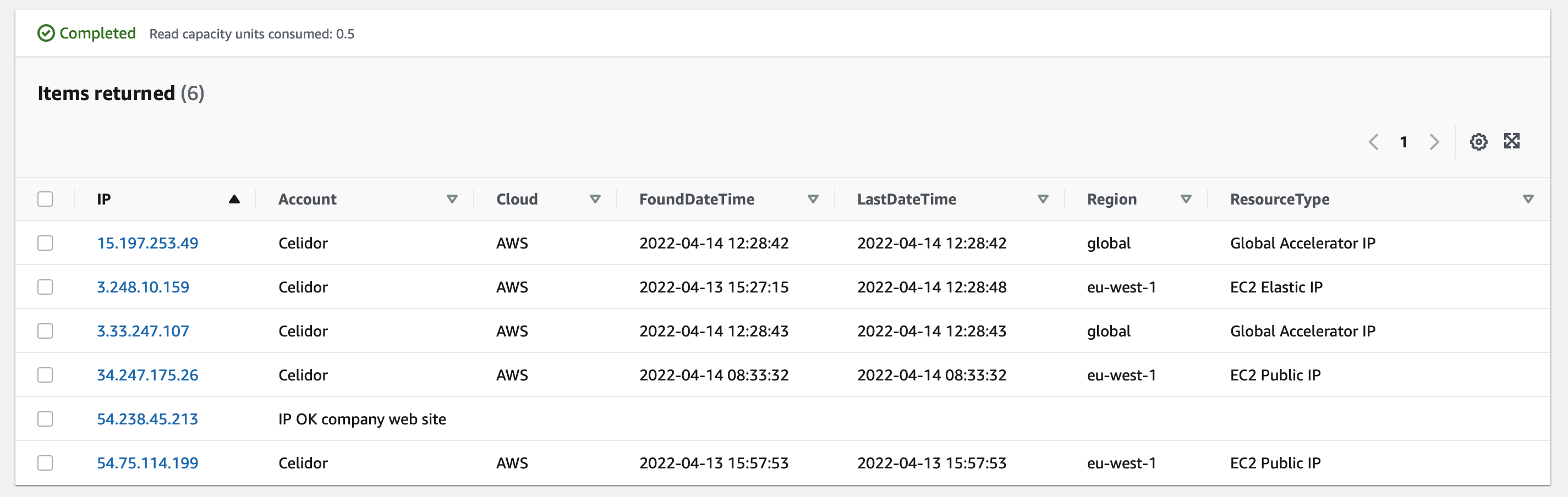
Domain Protect IP address database
- DynamoDB database table for IP addresses in Organization
- separate from vulnerability DynamoDB table
Authorising AWS IP addresses outside AWS Organization
The A record check may create false positive alerts where the IP address is within AWS, but outside the AWS Organization scanned by Domain Protect.
For example, the A record may point to a public IP address in a service provider's AWS account.
Approved AWS IP addresses outside the AWS Organization can be pre-authorised by setting the Terraform variable:
aws_ip_addresses = ["3.5.140.1", "15.230.15.30"]
If there is a network of AWS IP addresses which you wish to authorise, rather than a single address, add to the list in CIDR notation, e.g. 52.93.178.144/30.
Disabling A record feature
- set Terraform variable in your CI/CD pipeline or tfvars file:
ip_address = false
- apply Terraform
First time usage
- IP address database is populated by first scan
- vulnerability scans run once items are shown in database under
Item count - requires at least one IP address in database
- it may take up to 6 hours for DynamoDB to update
Item count
Minimising false positives
False positive alerts can occur when an 'A' record legitimately points to an IP address in an AWS account outside your organisation, for example a company website hosted by a third party.
To minimise false positive alerts:
- monitor Slack channel
- assess which IP addresses are legitimate
- immediately after deploying, add approved addresses to
aws_ip_addressesTerraform variable - complete before DynamoDB
DomainProtectIPsPrditem count updates from initial value of0
Optimising cost and performance
Optional Terraform variables can be entered in your CI/CD pipeline or tfvars file to optimise performance and cost:
ip_scan_schedulecan be reduced from24 hoursfor improved security at greater costip_time_limitcan be reduced from48hours for improved security but higher risk of false positivesallowed_regionscan be limited to those allowed by Service Control Policies, to reduce Lambda execution time and cost